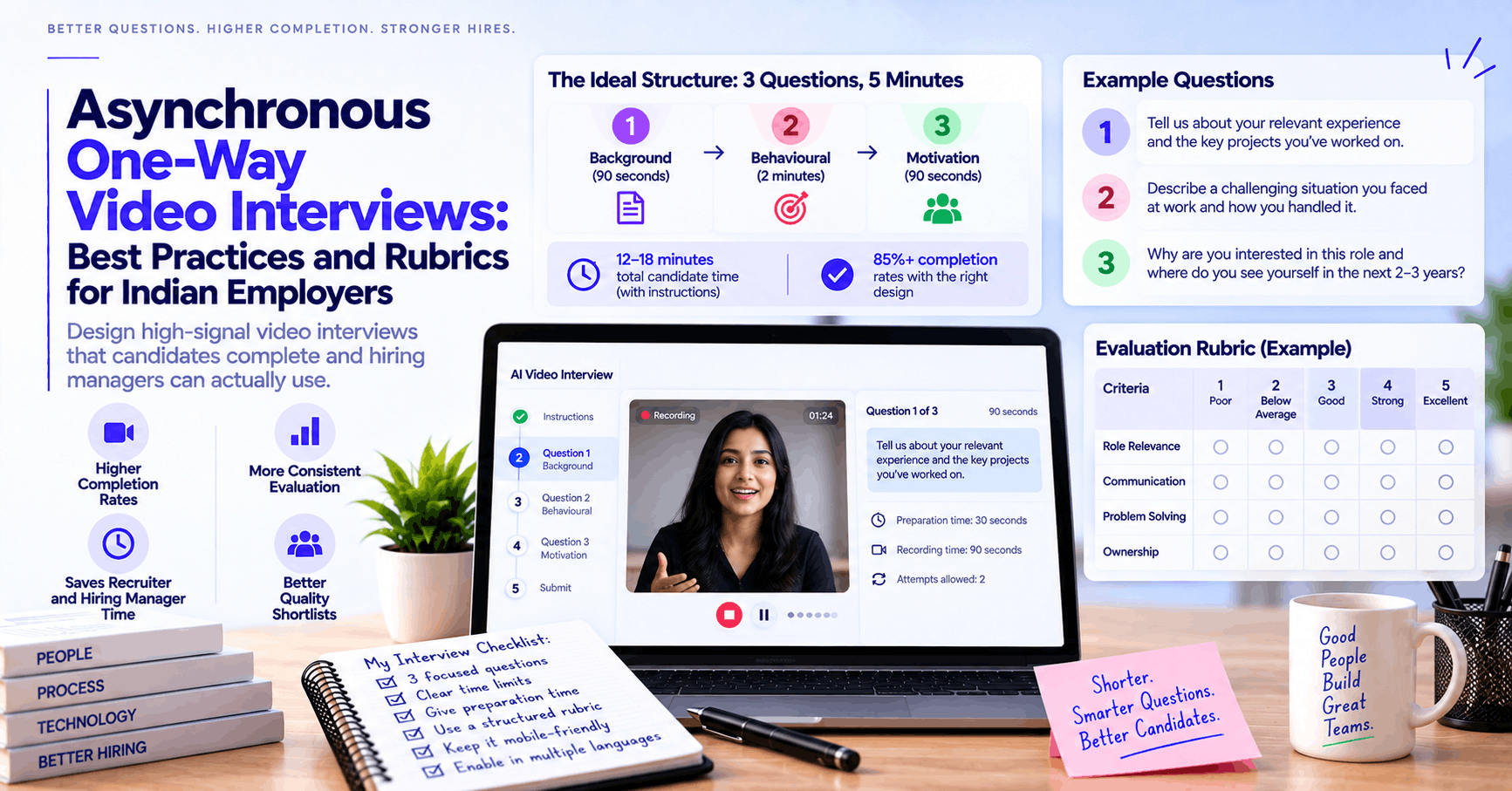
A one-way video interview that runs 3 targeted, competency-specific questions achieves 85%+ completion rates and gives a hiring manager more signal in 15 minutes of review time than a full day of phone screening. One that runs 8 questions, requires an app download, and offers only English gets 30–40% completion and produces a shortlist that skews toward candidates with the best setup and time, not the best fit. The difference is almost entirely in how the screening is designed. RecruitKar's asynchronous AI video interviews are browser-based, multilingual, and mobile-first — but the technology is only part of the answer. This post covers exactly how to structure, question, and score an async video screen that produces a genuinely useful shortlist.
Why async video interviews exist — and what problem they actually solve
The problem they solve is volume. A hiring manager who needs to evaluate 80 first-round candidates for a sales role cannot have 80 individual 30-minute phone calls without that becoming the job for two weeks. An async video interview lets those 80 candidates record their responses on their own schedule — in 15–20 minutes, from wherever they are — while the hiring manager reviews them in a consolidated 3–4 hour block, comparing responses to the same questions rather than reconstructing different conversations from memory.
The problem they introduce, if not designed carefully, is false signal. A candidate who records their response in a quiet home office with good lighting and a stable WiFi connection presents differently from a candidate who records it on a moving bus with background noise — regardless of actual job suitability. A screening with too many questions rewards candidates who can sustain camera-facing performance for 40 minutes rather than candidates who can do the job. And a screening conducted only in English measures English comfort in addition to (or sometimes instead of) job-relevant competency.
Good async video interview design minimises false signal and maximises true signal. This guide covers how.
The structural decisions that matter most
How many questions: the answer is 3
The instinct when designing an async video screen is to include everything you'd want to know — background, motivations, technical depth, behavioural examples, culture fit questions. This instinct produces 6–8 question screens that candidates abandon halfway through, generating a biased completion population (candidates who completed tend to be those with more time, better setups, and higher motivation to persist — not necessarily better fit).
Three questions is the number that consistently achieves the highest completion rates while still providing enough signal to make a meaningful shortlisting decision. The three questions should cover:
- A role-relevant background question — establishing that the candidate's experience is genuinely relevant, not just keyword-matched on their resume
- A behavioural competency question — asking for a specific past example that demonstrates the key competency the role requires
- A motivation/forward-looking question — establishing why this role, why this company, and what they're looking to do next
These three cover the essential signal: can they do it (background), have they done it (behavioural), and will they stay (motivation). Everything else can wait for the human interview.
Time limits per question: shorter than you think
The instinct is to give candidates generous time so they can give thorough answers. The outcome of 3-minute limits per question is typically that candidates fill all 3 minutes whether or not they have 3 minutes of relevant things to say — which makes reviewing 80 responses a much longer task than it needs to be.
Recommended limits:
- Background question: 90 seconds
- Behavioural question: 2 minutes
- Motivation question: 90 seconds
Total maximum recording time: 5 minutes of actual content. Total candidate time commitment including setup and transitions: 12–18 minutes. This is the zone where completion rates stay high across candidate demographics.
Prep time: yes, give candidates preparation time
One-way video interview platforms offer a choice: surprise questions (the candidate sees the question and immediately begins recording) or questions with a preparation window. Give candidates 30–60 seconds of preparation time before recording begins.
Why: preparation time reduces the "deer in headlights" effect that affects candidates who aren't used to asynchronous video — which skews results toward candidates with prior interview experience rather than toward actual competency. Giving 45 seconds to compose a response before recording begins produces answers that better reflect what candidates actually know, which is the point.
Retakes: allow one, not unlimited
Allowing unlimited retakes lets candidates polish their response until it's a performance rather than a genuine answer. Allowing zero retakes catches candidates who legitimately had a technical problem or experienced genuine panic. One retake is the right balance: a candidate who made a genuine mistake gets a second chance; a candidate looking to refine indefinitely is limited.
Browser-based, not app-required
This is the single most operationally significant decision for Indian employers, particularly for volume roles and Tier-2/3 city hiring. Requiring a candidate to download an app before completing an interview introduces:
- A barrier disproportionate to the ask (a candidate applying for a ₹4 LPA role is being asked to install an app on their phone before they've had any engagement with the company)
- Storage and compatibility friction on lower-end Android devices common in the Indian candidate population
- Drop-off from candidates who don't install the app because they're cautious about apps from unknown sources
Browser-based interviews — which run on a mobile browser without installation — achieve completion rates 15–25 percentage points higher than app-required equivalents for equivalent candidate populations, particularly for entry-to-mid-level roles. RecruitKar's async video interviews run entirely in a mobile browser without any download requirement.
Writing questions that produce useful signal
The background question: specific, not open-ended
Weak: "Tell me about yourself." This produces a rehearsed career summary that was prepared before the interview and tells you almost nothing that isn't on the resume.
Better: "Walk me through your experience in [specific domain] — specifically, what's the most complex [challenge / project / scenario] you've handled in this area, and what was your role in it?"
This is specific enough to require genuine recall rather than a prepared script, while open enough to let a candidate show genuine depth.
For a sales role example: "Walk me through a deal you're particularly proud of closing — what made it difficult, what was your approach, and what was the outcome?"
The behavioural question: STAR format guidance helps
Structured behavioural questions — asking for a specific past example in a Situation/Task/Action/Result format — produce more comparable, evaluable responses than open-ended questions. Give candidates a brief STAR prompt at the start of the question.
Example: "Think of a time when you had to manage a challenging situation with a client or stakeholder. Describe the situation briefly, what you did, and what the outcome was. I'll be looking for: what the specific challenge was, what actions you personally took (not the team), and what resulted from those actions."
The explicit guidance on what you're looking for isn't giving away the answer — it's ensuring candidates structure their responses in a way that's evaluable rather than producing loosely organised stories that require significant interpretation.
The motivation question: test specificity, not enthusiasm
Weak: "Why do you want to work here?" This produces rehearsed company research summaries that tell you whether the candidate did their homework, not whether their motivation is genuine.
Better: "What specifically about this role interests you, and what are you hoping to be doing differently in your next position compared to what you're doing now?"
The "differently" framing forces specificity — a candidate who gives a specific answer about what they're looking to do next is demonstrating real motivation; one who gives a generic "I want to grow and learn" answer is either early-career or hasn't thought it through.
Building a scoring rubric: the piece most teams skip
A scoring rubric turns a subjective video review into a structured evaluation. Without it, two hiring managers reviewing the same video screen will score candidates based on different implicit criteria — and the resulting shortlist reflects whoever was more influential in the discussion, not the most objectively qualified candidates.
How to build one in 20 minutes
Step 1: List the 2–3 most important things a candidate must demonstrate in each question's response.
Step 2: Define what a strong, acceptable, and weak response looks like for each criterion — specifically enough that a second reviewer would reach the same scoring conclusion.
Step 3: Assign a point value (e.g., 1–3 per criterion, or simple Strong/Acceptable/Weak) and a total score calculation.
Example rubric: sales role behavioural question
Question: "Tell me about a deal you closed that you're proud of."
- Specificity: Strong (3) — Names specific deal, company, and figures; Acceptable (2) — Names deal but vague on specifics; Weak (1) — Generic or hypothetical example
- Personal ownership: Strong (3) — Clearly describes their own actions, not the team's; Acceptable (2) — Some distinction but blurry; Weak (1) — Mostly describes team/other people
- Outcome clarity: Strong (3) — Quantified result (deal value, timeline, conversion rate); Acceptable (2) — Result stated without quantification; Weak (1) — No clear outcome described
- Obstacle and approach: Strong (3) — Specific obstacle named and how they addressed it; Acceptable (2) — Obstacle mentioned but approach vague; Weak (1) — No challenge described
Scoring: 10–12 = Strong, advance; 7–9 = Borderline, flag for second review; Below 7 = Do not advance
The rubric doesn't need to be elaborate to be useful — it needs to be specific enough that two reviewers using it would reach the same conclusion on the same response. Testing that by having two people independently score the same 5 responses before the full review process is a worthwhile 30-minute investment.
Reviewing async video responses efficiently
Watch at 1.5x speed
Reviewing 80 responses at normal speed takes 4–5 hours. At 1.5x speed it takes 2.5–3 hours, and candidate content (particularly responses to structured questions with short time limits) remains fully understandable. This is standard practice for experienced users of video screening tools and dramatically reduces the time cost of the review phase.
Use the rubric on screen while reviewing
Keep the rubric open alongside the video player — fill in the score for each criterion as you watch, rather than trying to reconstruct it from memory after 20 videos. Tools that embed the rubric directly in the review interface (rather than requiring a separate spreadsheet) reduce cognitive load and improve scoring consistency.
Flag, don't decide, on first pass
On the first review pass, use three buckets: Clear Yes (meets rubric threshold), Clear No (clearly below threshold), Borderline. Spend your decision-making energy on the Borderline group in a second pass rather than agonising over every response in the first one.
Avoid cascade bias
If reviewing responses sequentially, the score given to response 5 is influenced by what you saw in response 4 — a phenomenon called contrast effects. Where possible, randomise the order of response review rather than reviewing candidates in application-date order, and reset expectations explicitly between reviews by re-reading the rubric criteria before each video.
After the video screen: what comes next
Candidates who complete a video screen and don't hear anything for a week experience exactly the kind of silence that damages candidate experience and employer brand. Define a specific timeline for the decision and communicate it.
For candidates advancing to the next round: human interview scheduling integrated with interviewer calendars lets you send a scheduling link directly from the pipeline — candidates book a slot from real availability in one step, rather than triggering a fresh email coordination loop.
For candidates not advancing: a brief, respectful rejection message sent promptly. The specific message matters less than whether it's sent at all — the silence of never hearing back after recording a video response is the candidate experience failure that generates the most negative feedback about the hiring process.
For building future job postings with the right screening questions baked in: job description templates include pre-suggested async video screening questions aligned to common role types, so you're not starting from scratch for each new hire.
Frequently asked questions
How long should candidates be given to complete a one-way video interview after receiving the link? 48–72 hours is the sweet spot for most roles — long enough that candidates with work schedules can find a convenient window, short enough that they don't forget about it or lose interest. Extending the window to a week doesn't meaningfully improve completion rates and slows the hiring timeline. For urgent roles, a 24-hour window is workable if the invitation makes the urgency clear.
Should we tell candidates they're being evaluated by AI? Yes, and explicitly. Under India's DPDP Act 2023 obligations around informed consent, candidates should know that their video response will be processed by an AI system and that AI-generated scores inform the shortlisting decision. Beyond compliance, transparency consistently improves candidate trust and reduces the anxiety that degrades performance in the interview itself.
What's the right number of candidates to put through a video screen? All candidates who passed your resume screen — not a selected sub-group. The efficiency of async video screening relative to phone screening comes precisely from being able to evaluate the full shortlist rather than a manually selected portion of it. Filtering manually before the video screen reintroduces the resume-quality bias the screen was meant to complement.
How do we handle candidates who have technical difficulties completing the screen? A clear fallback path should be built into the process: a contact for technical issues, and a commitment to respond within a defined timeframe. Some percentage of non-completions is technical failure rather than disinterest — a follow-up message for candidates who opened the link but didn't complete, offering assistance or an alternative, is standard practice and typically recovers 10–15% of non-completions.
Can the same video interview be used for multiple similar roles at the same time? Yes, with care. Questions written for a specific role type can be reused across similar roles — the same behavioural question for a sales AE role is likely appropriate for three similar AE openings simultaneously. The rubric needs to be role-specific even if the questions are shared, since what counts as a strong answer to "tell me about a complex deal you closed" depends on the seniority and specific context of each role.
Create your first asynchronous video screening pipeline on RecruitKar. Set up 3 questions, configure your rubric, and send screening links to your entire shortlist in under 10 minutes — asynchronous AI video interviews, browser-based, multilingual, mobile-first.