Boolean search has been a core recruiting skill for long enough that it's practically a rite of passage — the moment a new sourcer graduates from typing plain-language searches into LinkedIn to building a real search string with quotes, parentheses, and operators strung together. It's not glamorous, but it remains one of the highest-leverage skills a recruiter can have, because it's the difference between searching and actually finding.
This is a practical, working reference — the operators that matter, real examples, common mistakes, and an honest note on where Boolean search is starting to show its limits as sourcing tools evolve.
What Boolean Search Actually Is
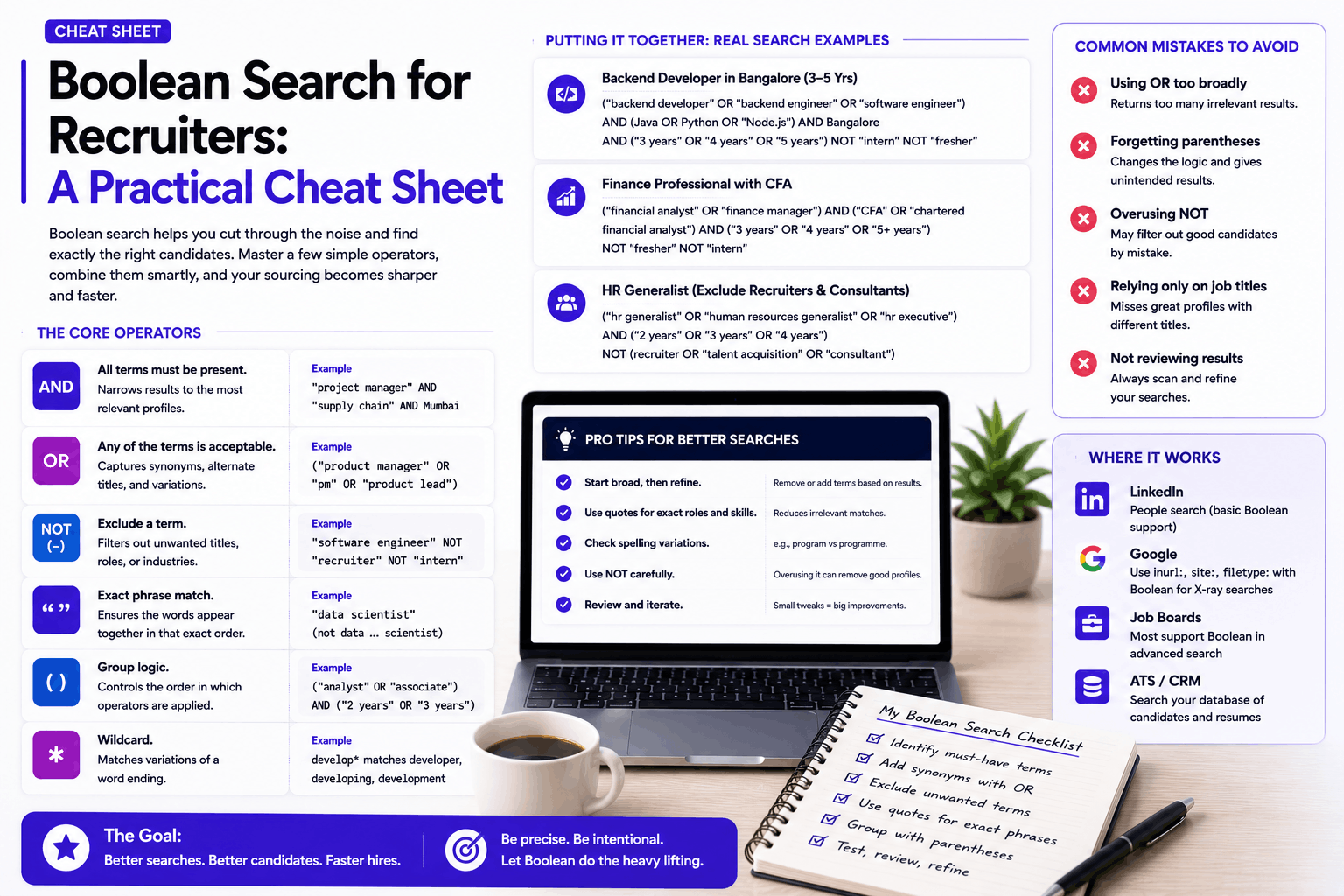
Boolean search uses a small set of logical operators — AND, OR, NOT, along with quotation marks and parentheses — to build precise search queries instead of relying on a search engine's best guess at what you meant. Instead of searching "marketing manager Mumbai" and hoping the results are relevant, a Boolean string lets you specify exactly what must be present, what's acceptable as an alternative, and what should be excluded.
It works across LinkedIn, Google, and most job boards and CRM/ATS search functions, though the exact syntax support varies slightly by platform — worth checking the specific platform's search documentation if a string isn't behaving as expected.
The Core Operators, with Real Examples
AND — Every Term Must Be Present
Use AND (usually written in capital letters, though most platforms default to treating a space between terms as an implicit AND) to require multiple terms simultaneously.
Example: "project manager" AND "supply chain" AND Mumbai This returns only profiles containing all three terms — narrowing results to a more specific, relevant set than searching any one term alone.
OR — Any of the Terms Is Acceptable
Use OR to capture variations of the same idea — different job titles that mean roughly the same thing, alternate spellings, or synonyms.
Example: ("project manager" OR "programme manager" OR "program manager") Since the same role gets titled differently across companies (and "programme" vs. "program" varies by region), OR captures all reasonable variants in one search rather than requiring separate searches for each.
NOT (or the Minus Sign) — Exclude a Term
Use NOT to filter out results containing a specific term, most commonly to exclude a job title you don't want, or to filter out recruiters and consultants surfacing in results meant for a different candidate profile.
Example: "software engineer" NOT "recruiter" NOT "intern" This helps exclude recruiters who list "software engineer" somewhere in their profile (common when sourcing for that role themselves) and filters out interns if you're specifically looking for full-time, experienced candidates.
Quotation Marks — Exact Phrase Matching
Quotes force a search engine to treat the enclosed words as an exact phrase, rather than matching each word independently anywhere in a profile.
Example: "product manager" (with quotes) returns profiles where those two words appear together as a phrase, versus product manager (without quotes), which might return a profile that separately mentions "product" in one context and "manager" in an unrelated one.
Parentheses — Grouping Logic
Parentheses control the order operators are applied, similar to mathematical order of operations — critical once a search string combines AND, OR, and NOT together.
Example: ("data scientist" OR "data analyst") AND Python AND ("2 years" OR "3 years" OR "4 years") Without parentheses grouping the OR terms, a search engine might interpret the operators in an unintended order, producing results that don't match what was actually intended.
The Asterisk (*) — Wildcard Matching
Some platforms support a wildcard character to match variable endings on a word.
Example: develop* can match "developer," "developing," "development," depending on platform support — useful for capturing variants without writing out every possible ending.
Putting It Together: Realistic Full Search Strings
Sourcing a mid-level backend developer in Bangalore: ("backend developer" OR "backend engineer" OR "software engineer") AND (Java OR Python OR "Node.js") AND Bangalore AND ("3 years" OR "4 years" OR "5 years") NOT "intern" NOT "fresher"
Sourcing a finance professional with specific certification: ("financial analyst" OR "finance manager") AND ("CFA" OR "chartered financial analyst") AND (Mumbai OR Delhi OR Bangalore) NOT student
X-ray search (searching a specific site through a search engine, rather than that site's own internal search): site:linkedin.com/in "HR business partner" AND "SAP SuccessFactors" AND India This structure searches Google for LinkedIn profile pages matching the criteria, useful when a platform's native search has limitations, or when trying to search across multiple sources with one consistent syntax.
Common Mistakes Worth Avoiding
- Overloading a single search with too many required terms. A string requiring six different exact skills, an exact title, an exact location, and an exact experience range often returns zero or near-zero results, because very few real profiles will happen to contain every single term worded exactly that way. Start narrower than you think necessary and broaden if results are too thin, rather than starting broad and trying to narrow an unmanageable pile.
- Forgetting that people describe the same experience differently. A candidate who's genuinely a strong fit for "project manager" might have described their role as "delivery lead," "program coordinator," or something else entirely on their profile. A search string that only accounts for one phrasing will systematically miss qualified candidates who used different words for the same underlying experience — this is one of Boolean search's most persistent, structural limitations.
- Ignoring regional and dialectal variations. "Program" vs. "programme," "recruiter" vs. "talent acquisition specialist," "HR" vs. "human resources" — building OR groups that account for common regional and terminology variants meaningfully widens results without sacrificing relevance.
- Not testing and iterating. A search string that returns too few or clearly irrelevant results usually means adjusting operators, not abandoning the technique — try loosening one AND condition to an OR, or removing an overly specific NOT exclusion, and observe how results change.
- Relying on a single search string for an entire sourcing effort. Different phrasings, different operator combinations, and searching across multiple platforms (LinkedIn, Google/X-ray, job boards) each surface a somewhat different, overlapping set of candidates — no single string captures everyone worth finding.
Platform-Specific Notes
LinkedIn has its own search syntax quirks and periodically changes what's supported in free versus paid search tools — it's worth checking LinkedIn's current search operator documentation directly, since capabilities have shifted over time and some historically supported operators have been restricted in certain LinkedIn product tiers.
Google (X-ray search) generally supports the full range of Boolean operators described above, and site: searches let you effectively search within a specific platform (LinkedIn, a specific job board, even a specific company's careers page) using Google's broader indexing and search capabilities as a workaround when a platform's own internal search is more limited.
ATS and CRM search tools vary significantly in Boolean support — some fully support the operators above, others have simplified filter-based search instead. Worth confirming what a specific tool actually supports rather than assuming standard Boolean syntax will work identically everywhere.
Where Boolean Search Is Starting to Show Its Age
It's worth being honest about this, since Boolean search's core strength is also its core limitation: it requires you to guess the right words in advance. A candidate who's a genuinely excellent fit for a role, but who described their experience using entirely different terminology than what you searched for, simply won't appear in your results — no amount of clever operator use fixes a fundamental mismatch between the words you searched and the words the candidate happened to use.
This is exactly the gap that context-aware, AI-driven sourcing tools are built to close — instead of matching exact keywords, they attempt to understand what a candidate actually did and compare that against what a role actually requires, catching relevant candidates that a keyword-based search, however well-constructed, would miss entirely.
Recruitkar's AI candidate discovery works by matching a job description's actual content against candidate experience directly, rather than requiring a recruiter to anticipate every possible phrasing a strong candidate might have used.
This doesn't make Boolean search obsolete — it remains a fast, precise, and free tool for straightforward searches, particularly when you already know roughly how a target candidate pool tends to describe itself (technical roles, for instance, often use fairly standardized terminology). But it's worth recognizing Boolean search as one tool in a broader sourcing toolkit rather than the entire strategy, especially for roles where candidates come from more varied backgrounds and describe similar experience in genuinely different ways.
Building Strings for Harder-to-Source Roles
Some roles are structurally more difficult to search for with Boolean logic than others, and it helps to recognize which category you're in before spending too long refining a single string. Highly standardized technical roles — where job titles, tools, and skill terminology are fairly consistent across companies and regions — tend to respond well to Boolean search, since the vocabulary candidates use to describe themselves is relatively predictable. Roles with more varied terminology — operations, general management, cross-functional roles that get titled differently at nearly every company, or roles common in industries with less standardized job-title conventions — are considerably harder to capture completely with keyword-based search, no matter how many OR variants you add. For these harder cases, it's often more efficient to build a deliberately broader, less restrictive search and expect to manually review a larger set of results, rather than trying to perfect an increasingly complex string that still won't catch every relevant variant.
A Note on Combining Boolean Search with Other Sourcing Channels
Even a well-built Boolean string only searches within one platform's indexed data at a time — a string run on LinkedIn won't surface a candidate who's active primarily on a job board, or someone who applied directly to a previous posting and is already sitting in your own database. Treating Boolean search as one channel among several — alongside job board imports, referrals, direct applications, and your own historical candidate pool — tends to produce a more complete picture than relying on it as the sole sourcing method, however refined the search string itself becomes.
A Short Worked Example, Start to Finish
It helps to see the full process rather than just isolated operator examples. Suppose you're sourcing a mid-level UX designer in Pune. A first attempt might be a broad string: "UX designer" AND Pune. Running this likely returns a large, only loosely relevant set — some genuinely strong candidates, some UI (not UX) designers, some students, some unrelated profiles that happen to mention both terms separately. The next iteration tightens this: ("UX designer" OR "user experience designer" OR "product designer") AND Pune AND (Figma OR Sketch) NOT intern NOT fresher — adding title variants recruiters commonly see for this role, requiring a relevant tool to filter for actual practicing designers, and excluding early-career profiles if you specifically need someone more experienced. If this still returns too few results, loosening the tool requirement to an OR with more options, or removing it entirely and reviewing candidates manually, is usually more productive than continuing to add restrictive AND conditions. This kind of iterative tightening and loosening — rather than trying to write one perfect string on the first attempt — is how experienced sourcers actually work in practice.
A Practical Cheat Sheet to Keep Handy
- AND — Require all terms — "data analyst" AND SQL
- OR — Accept any of several terms — (Python OR "R programming")
- NOT / − — Exclude a term — NOT "intern"
- " " — Exact phrase match — "product manager"
- ( ) — Group logic, control order — ("A" OR "B") AND "C"
- * — Wildcard for word variants — develop*
- site: — Restrict search to one site (Google X-ray) — site:linkedin.com/in
The Bottom Line
Boolean search remains a genuinely useful, low-cost skill for recruiters — fast, precise when built well, and free on most platforms. The real skill isn't memorizing operators, it's anticipating the different ways a target candidate might describe their own experience, and building searches broad enough to catch that variation without becoming so broad they return an unmanageable, irrelevant pile of results. And it's worth knowing its limits: for roles where candidates describe similar experience in genuinely varied language, no Boolean string, however cleverly constructed, fully replaces a sourcing approach that can understand context rather than just match keywords.