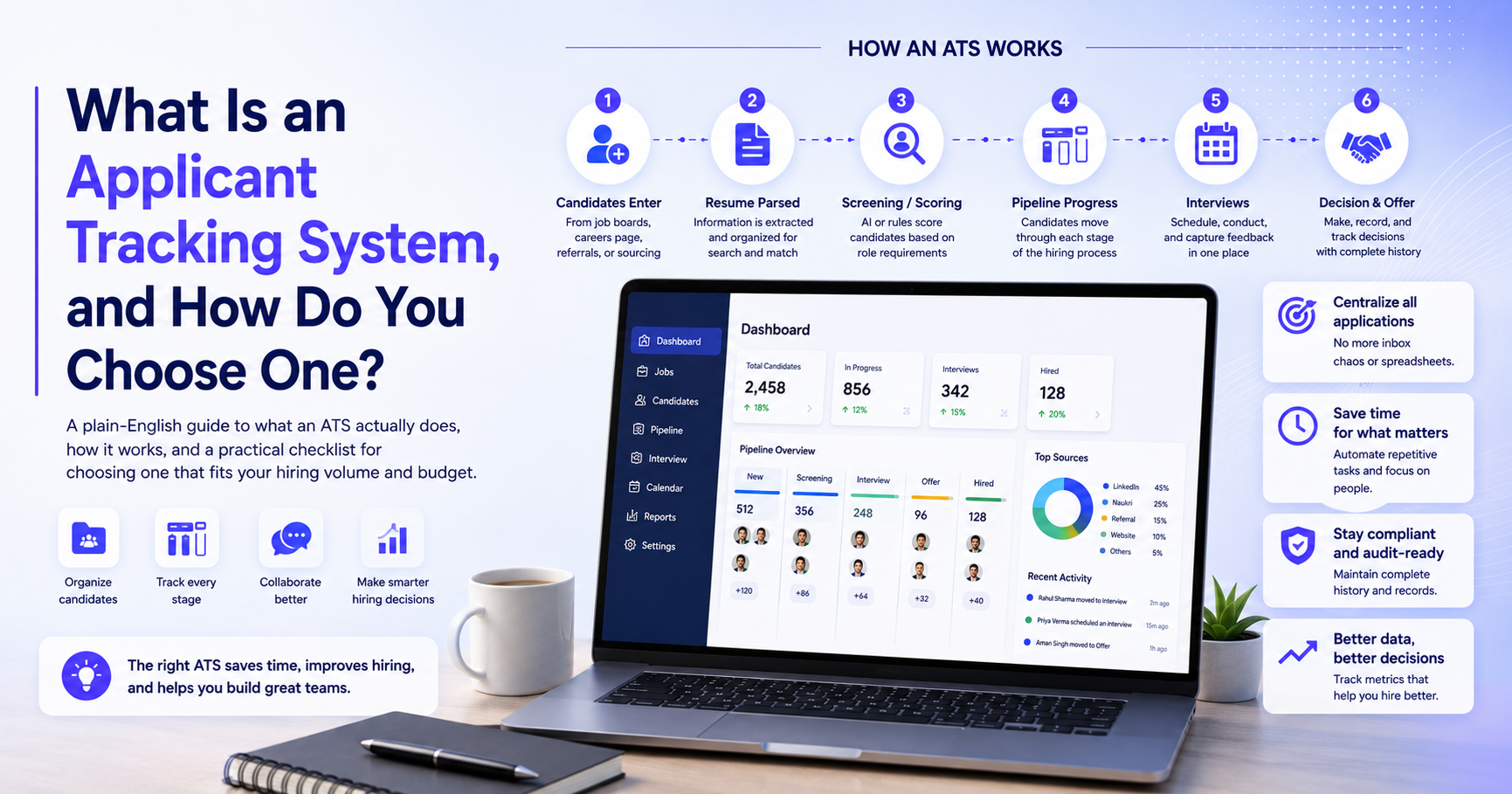
If you've ever applied for a job online and gotten an automated "thank you for applying" email within seconds, you've interacted with an applicant tracking system, even if you didn't know it. If you've ever heard the (partly true, often exaggerated) claim that "your resume gets rejected by a robot before a human ever sees it," that's also an ATS — for better and occasionally for worse.
For recruiters and hiring managers, though, an ATS isn't a mysterious gatekeeper — it's simply the system of record for hiring. This guide covers what an ATS actually does, how it's evolved, and a practical way to evaluate one if you're choosing your first system or replacing an outgrown one.
What is an applicant tracking system, in plain terms
An applicant tracking system (ATS) is software that manages candidates through every stage of the hiring process — from the moment they apply (or get sourced) to the moment they're hired or rejected. At its core, it does three things:
- Collects applications from job boards, your careers page, referrals, or direct sourcing, in one place instead of scattered across email inboxes and spreadsheets.
- Tracks candidates through stages — applied, screened, interviewed, offered, hired, or rejected — usually visualized as a pipeline or Kanban-style board.
- Records the history of every interaction — resumes, notes, interview feedback, email threads — so nothing lives only in one recruiter's inbox or memory.
That's the baseline. Modern ATS platforms have layered a lot more on top of this — AI resume screening, interview scheduling, candidate messaging — but the core job hasn't changed: give a hiring team one shared, organized view of every candidate for every open role.
Why hiring teams need one (even small ones)
It's tempting to think an ATS is only necessary once you're hiring at real volume, and to run early hiring out of email and spreadsheets instead. That works, briefly — and then breaks down in predictable ways:
- Candidates fall through the cracks. A resume sitting in someone's inbox gets missed when they're on leave, switch roles, or simply have too many emails that week.
- Nobody has a shared view. A hiring manager asking "where are we on this role?" turns into someone manually reconstructing status from three different email threads.
- Feedback gets lost. Interview notes scattered across Slack messages, personal notebooks, and email replies are effectively unsearchable a month later, when you're trying to remember why a candidate was passed over.
- Compliance and audit trail become impossible. If you ever need to show why a hiring decision was made — increasingly relevant as hiring-related regulation tightens — "it's somewhere in my inbox" isn't a defensible answer.
Even a team hiring for three or four roles a quarter benefits from having one place where every candidate's status, resume, and history live — the value isn't really about volume, it's about not losing information.
How an ATS actually works, step by step
- Candidates enter the system. This happens through a job board integration, a careers-page application form, direct sourcing by a recruiter, or a referral. Better systems de-duplicate automatically — so the same person applying twice, or being sourced and then applying directly, doesn't create two disconnected records.
- Resumes get parsed. The system extracts structured information — name, contact details, work history, skills, education — from an unstructured resume file (PDF, DOCX, etc.) so it becomes searchable and comparable data, not just an attachment.
- Candidates get screened or scored. This is where the "robot rejects your resume" reputation comes from. Traditional ATS screening often relied on simple keyword matching, which is exactly why oddly-phrased resumes sometimes got filtered out unfairly. Newer, AI-driven screening tries to score based on actual relevant experience and context rather than exact keyword matches — a meaningful improvement, though not a perfect one.
- Candidates move through a pipeline. Typically something like: New → Screened → Interviewing → Offer → Hired, with a parallel Rejected/Withdrawn track. Recruiters and hiring managers can see, at a glance, exactly where every open role stands.
- Interviews get scheduled and recorded. Either through calendar integrations for live interviews, or through built-in AI video interview tools for asynchronous first rounds — with notes, scorecards, and feedback attached directly to the candidate's record.
- A decision gets made and recorded. Offer, hire, or rejection — along with the reasoning, which matters both for internal learning (are we consistently passing on a certain profile for a reason worth examining?) and for compliance.
What separates a basic ATS from a genuinely useful one
Plenty of systems technically qualify as an "ATS" while doing very little beyond storing resumes. Here's what tends to separate a genuinely useful platform from a glorified spreadsheet with a nicer interface:
- Real search, not just filters. Can you find "candidates with 3+ years in supply chain who applied for any role in the last 6 months," or only filter by the exact tags someone remembered to apply at the time?
- Collaboration built in. Can a hiring manager leave feedback directly on a candidate without a separate email thread? Can multiple interviewers see each other's notes before making a decision, to avoid groupthink or, conversely, redundant questioning?
- Source tracking that's actually useful. Knowing which channel — a specific job board, a referral program, direct sourcing — actually produces hires (not just applicants) is what lets you stop spending on channels that generate volume but not quality.
- Integration with the rest of your sourcing and outreach. A pipeline that only holds candidates who have already applied, disconnected from your sourcing and outreach tools, means double data entry every time a sourced candidate needs to move into the tracked process. Platforms like Recruitkar build the ATS as the destination for every sourcing channel — AI-discovered candidates, job board imports, referrals, and direct applications — so nothing needs to be manually re-entered once someone enters the funnel.
- Reporting that answers real questions. Time-to-hire, time-in-stage, offer-acceptance rate, and source-of-hire are the numbers that actually inform decisions — a system that can't produce these easily is going to leave you guessing.
A practical checklist for choosing an ATS
If you're evaluating options, work through these questions rather than just comparing feature lists side by side — feature lists tend to look similar across vendors, and the differences that actually matter are usually in the details.
- Does it match your hiring volume, not someone else's? A system built for enterprise-scale, thousand-candidate-per-role hiring will feel unnecessarily complex for a team filling ten roles a year — and a lightweight system built for a small team will buckle under genuinely high-volume hiring. Be honest about which category you're actually in.
- How does it price, and does that pricing model fit how you actually hire? Seat-based pricing (per recruiter login) can get expensive if a small team is handling a lot of requisitions. Usage or credit-based pricing scales with actual hiring activity, which often suits teams with seasonal or unpredictable volume better. Confirm what's included at the base price versus billed as an add-on — interview scheduling, WhatsApp or SMS outreach, and AI screening are common places vendors charge extra.
- Can you actually try it on a real role before committing? Demo environments are built to look clean; real candidate data reveals a lot more about how a system actually performs — how well resume parsing handles messy real-world resumes, how intuitive the pipeline actually feels day-to-day, whether search returns what you'd expect. If a vendor won't let you test against a live role, treat that as a signal worth asking about directly.
- Does it connect sourcing, outreach, and interviews, or just track applicants who already showed up? If most of your hiring involves actively sourcing candidates (not just waiting for applications), check whether the ATS is genuinely connected to sourcing and outreach or is a separate silo you'll need to manually feed. Recruitkar's sourcing tools and outreach features — including email, WhatsApp, and voice calling — feed directly into its pipeline for exactly this reason, but the more general lesson applies regardless of which vendor you choose: check the actual data flow, not just whether both features technically exist somewhere in the product.
- How is candidate data handled, and what happens if you leave? Ask directly whether candidate data is exportable if you switch systems later, and how data privacy is handled — especially relevant given how much personal information (resumes, interview recordings, contact details) an ATS accumulates over time.
- Does it support how your team actually collaborates? If hiring managers are meaningfully involved in decisions (as opposed to recruiters working in isolation), check whether they can realistically use the system too — a tool only recruiters will touch just becomes another bottleneck for hiring-manager feedback.
- Is reporting actually useful, or just decorative? Ask for a real report — not a marketing screenshot — showing time-to-hire, pipeline conversion by stage, and source-of-hire. If those numbers aren't easily accessible, you'll end up manually reconstructing them in a spreadsheet anyway, which defeats a lot of the point of having a system.
Common mistakes when choosing (or outgrowing) an ATS
- Buying for the hiring volume you hope to have, not the volume you actually have. An enterprise system is often wasted complexity and cost for a team hiring for a handful of roles a year.
- Ignoring how sourcing and outreach connect (or don't) to the pipeline. This is the single biggest source of "we have an ATS but still use spreadsheets" — usually because sourced candidates never made it cleanly into the tracked pipeline in the first place.
- Underestimating adoption friction. The best ATS on paper is worthless if hiring managers find it clunky enough to avoid, and revert to email for feedback instead.
- Not asking about AI screening bias. If a system scores or ranks candidates automatically, it's worth understanding — before you commit, not after — how that scoring logic was built and whether it's been tested for bias against any particular group.
A few common questions
Is an ATS the same thing as recruitment software? Not quite — "recruitment software" is the broader category, which can include sourcing tools, outreach platforms, and interview software that may or may not include a pipeline. An ATS specifically refers to the system that tracks candidates through stages. Many modern platforms bundle both under one roof, which is increasingly the norm rather than the exception, but the terms aren't strictly interchangeable.
Does using an ATS mean a "robot" decides who gets hired? No — even AI-driven screening in a modern ATS is generally designed to narrow down or rank a candidate pool, not make a final hiring decision on its own. The final call almost always sits with a human recruiter or hiring manager. That said, it's a fair question to ask any vendor directly: what decisions does the system make automatically, and what always requires human sign-off?
Can a small business realistically justify the cost of an ATS? Usually yes, once you're hiring more than a handful of roles a year — the cost of a basic ATS plan is often smaller than the cost of a single candidate falling through the cracks due to a missed email. Many platforms offer low-cost entry tiers specifically for this reason, so it's worth comparing actual entry pricing rather than assuming an ATS is inherently an enterprise expense.
How long does it take to set up and start using an ATS? For a cloud-based system, initial setup (creating your first pipeline, connecting a careers page or job board) typically takes hours to a few days, not weeks — the bigger time investment is usually getting hiring managers comfortable using it, which is a change-management task more than a technical one.
What's the difference between an ATS and a CRM for recruiting? An ATS tracks active candidates through an open role. A recruiting CRM (candidate relationship management system) is built for nurturing a broader talent pool over time — people you're not actively hiring right now but want to stay in touch with for future roles. Some platforms blend both; it's worth knowing which one you actually need before evaluating options, since they solve different problems.
The bottom line
An applicant tracking system, stripped of the jargon, is just a shared, organized memory for your hiring process — who applied, where they are, what's been said about them, and why a decision was made. The best one for your team isn't necessarily the one with the longest feature list; it's the one that matches your actual hiring volume, connects cleanly to however you source and reach candidates today, and that hiring managers will actually use without being reminded to. Start from your own bottleneck — lost candidates, no shared visibility, disconnected sourcing — rather than a generic checklist, and the right fit becomes a lot easier to spot.