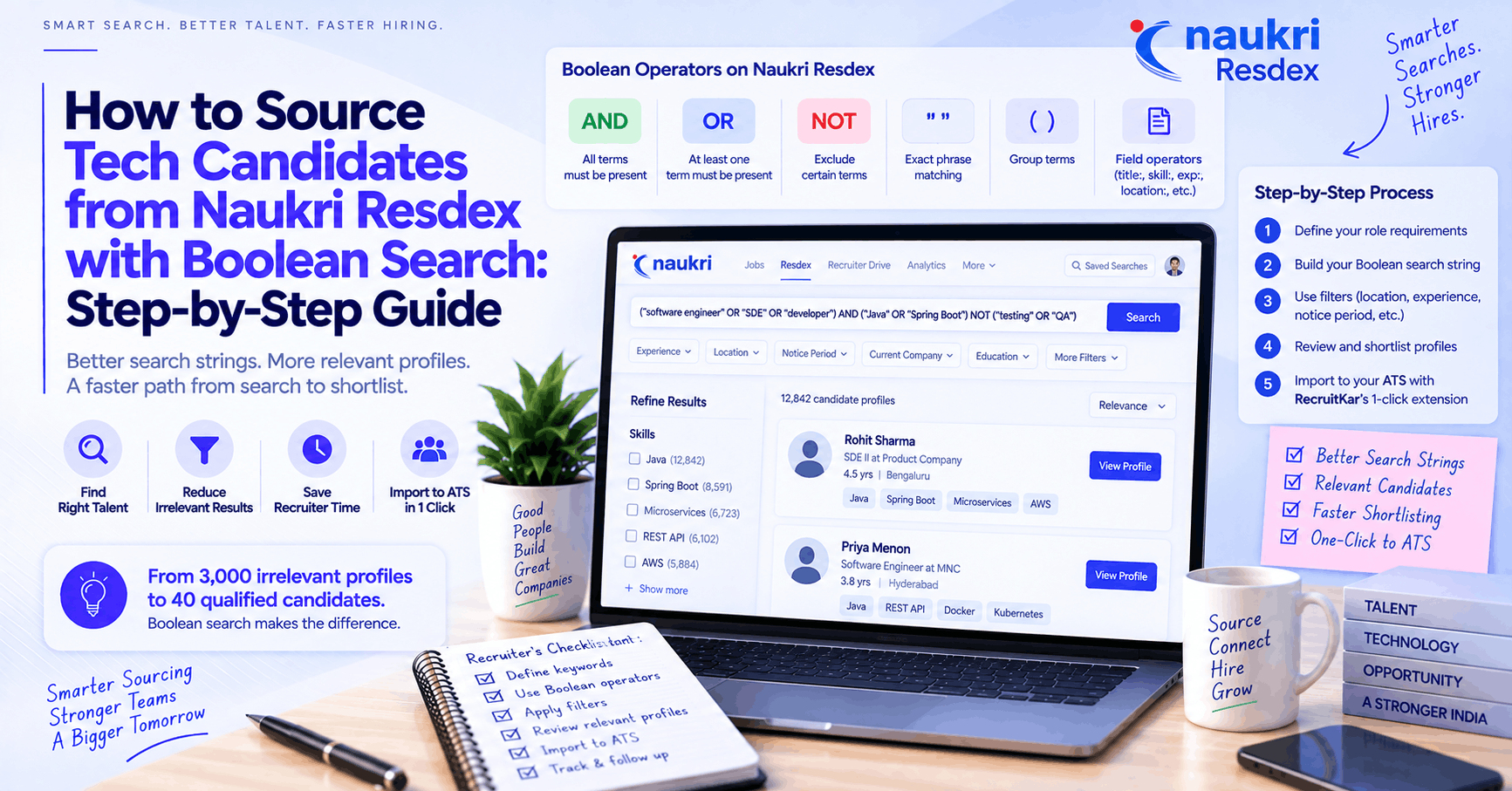
Naukri Resdex holds over 120 million candidate profiles — the largest active job-seeker database in India. Boolean search is what separates a recruiter who gets 3,000 irrelevant results from one who gets 40 qualified shortlisted profiles from the same search. This guide covers the Naukri search operators that actually work, ready-to-use search strings for popular tech roles, advanced filtering for notice period and location, and how to import shortlisted profiles into your ATS pipeline with RecruitKar's 1-click Naukri Chrome extension — so profiles move straight from Naukri into your hiring pipeline without re-entry.
Why Boolean search on Naukri is worth mastering
Naukri's default "Relevance" search is a black box. It optimises for engagement, not for your specific role requirements — surfacing candidates who are actively searching and whose profiles match loosely, rather than the best-qualified candidates in the database.
Boolean search bypasses the recommendation layer entirely. You define exactly what must be present, what's acceptable as a variation, and what should be excluded — and Naukri returns profiles that match your criteria, not its own relevance algorithm.
A recruiter using Resdex without Boolean knowledge might review 200 profiles to shortlist 8 candidates; the same recruiter with a well-constructed Boolean string can often get to a shortlist of 15–20 from a search that returns 300–400 genuinely filtered profiles rather than 3,000 loosely matched ones.
The Boolean operators Naukri Resdex actually supports
Naukri Resdex supports the core Boolean operators, but the implementation has specific quirks that differ from LinkedIn or Google — these matter.
AND
All terms must be present in the profile. In Resdex, AND is implicit between adjacent terms in most fields — typing React Node.js is equivalent to React AND Node.js. Writing AND explicitly in capitals also works.
Example: React AND Node.js AND TypeScript — returns profiles containing all three terms somewhere in the resume.
OR
At least one of the terms must be present. Useful for capturing role-title variations and synonyms. Must be written in capitals in Resdex.
Example: ("software engineer" OR "software developer" OR "SDE") — captures all three title variations in a single search.
NOT
Excludes profiles containing a specific term. Useful for filtering out irrelevant profiles, recruiters appearing in results, and over-specified titles.
Example: Java NOT (.NET OR PHP OR "Ruby on Rails") — returns Java-focused profiles while excluding those whose primary background is a different stack.
Quotation marks (" ")
Forces exact phrase matching. Essential for job titles, degree names, and multi-word skills. Without quotes, project manager may match profiles where "project" and "manager" appear in unrelated contexts. With quotes, "project manager" only matches profiles where those two words appear together.
Parentheses ( )
Groups OR expressions and controls the order in which operators are applied — exactly as in mathematical order of operations.
Without parentheses (ambiguous): Java OR Python AND AWS
With parentheses (explicit intent): (Java OR Python) AND AWS
The second version clearly means "someone with Java or Python, who also knows AWS." The first may be interpreted differently depending on the operator precedence the platform applies.
Naukri-specific field operators
This is where Resdex differs from general Boolean search and where most of the value lives.
title: searches within the current job title field specifically, rather than anywhere in the resume. title:"data engineer" returns profiles where the person's current designation is Data Engineer — not everyone who has ever worked on data engineering tasks.
skill: searches within the skills section specifically. skill:Python AND skill:Spark returns profiles where both are explicitly listed as skills, rather than mentioned in passing anywhere in the CV.
exp: filters by years of experience and accepts ranges. exp:4-8 filters for profiles with 4–8 years of total experience.
loc: filters by current location. loc:Bengaluru or loc:(Bengaluru OR Hyderabad OR Pune) limits results to candidates currently in those cities.
np: filters by notice period — one of the most practically useful Resdex-specific operators, rarely covered in general Boolean guides. np:15 returns candidates with a notice period of 15 days or less. np:30 returns candidates available within 30 days. np:0 returns candidates who are currently serving notice or immediately available.
Step-by-step: building a Naukri Boolean search string from scratch
Step 1: Define the non-negotiables
Before writing any string, answer three questions:
What technical skills or certifications are genuinely required (not just preferred)?
What experience range is actually necessary for this role?
What location and notice period constraints are real vs. negotiable?
Anything genuinely required goes into an AND condition. Anything that's an acceptable variant goes into an OR group.
Step 2: Build the skills cluster
Group synonyms and variants with OR; join distinct required skills with AND.
(Java OR "Core Java") AND (Spring Boot OR "Spring Framework") AND (Microservices OR "Micro Services")
Step 3: Add title filtering where relevant
For senior or specialized roles where you want to ensure the person is currently doing the work, add a title filter:
title:("backend engineer" OR "software engineer" OR "SDE II" OR "SDE 2")
Step 4: Add the Resdex-specific filters
Experience, location, notice period, and current company/industry filters are typically applied through Resdex's sidebar filter panel rather than the keyword field — these combine with your keyword string rather than replacing it.
Experience: Use the slider (e.g., 4–8 years)
Location: City selector or loc: in the keyword field
Notice period: np: in the keyword field, or the notice period filter panel
Current industry: Use the industry filter panel if the sector context matters
Step 5: Test, observe, refine
Run the string and look at the first 20–30 results:
Are profiles genuinely relevant? If not, what's causing the false positives — a term appearing in an unexpected context?
Too few results? Which AND condition can be loosened to an OR?
Too many results? Which additional AND condition would narrow without over-filtering?
Iterating through two or three versions of a string takes 5–10 minutes and typically produces a meaningfully better shortlist than the first attempt.
Ready-to-use search strings for common tech roles
These are working starting points — adapt the OR groups based on what your specific role actually requires.
Full-stack developer (MERN/MEAN)
(React OR "ReactJS" OR "React.js") AND (Node.js OR NodeJS OR "Node JS") AND (MongoDB OR MySQL OR PostgreSQL) AND (JavaScript OR TypeScript)
Sidebar filters: exp: 3–7 years, loc: [City], np: 30 or less
Java backend engineer
(Java OR "Core Java") AND ("Spring Boot" OR "Spring MVC" OR "Spring Framework") AND (Microservices OR REST OR "RESTful APIs") AND (AWS OR Azure OR GCP)
Sidebar filters: exp: 4–9 years, title: ("software engineer" OR "backend engineer" OR "SDE")
Data engineer
("data engineer" OR "data pipeline" OR ETL) AND (Python OR Scala OR PySpark) AND (Apache Spark OR Databricks OR Airflow) AND (AWS OR GCP OR Azure OR Snowflake)
Sidebar filters: exp: 3–8 years, skill: Python
DevOps / SRE
(DevOps OR SRE OR "site reliability") AND (Kubernetes OR Docker OR Helm) AND (Terraform OR Ansible OR "Infrastructure as Code") AND (AWS OR GCP OR Azure)
Sidebar filters: exp: 3–7 years, np: 30 or less
Data scientist / ML engineer
("data scientist" OR "machine learning" OR "ML engineer") AND (Python OR R) AND ("scikit-learn" OR TensorFlow OR PyTorch OR XGBoost) AND (SQL OR Spark)
Sidebar filters: exp: 2–6 years, skill: Python
Product manager (tech)
("product manager" OR "product owner" OR "APM") AND ("product roadmap" OR "user stories" OR "agile" OR "scrum") AND (SaaS OR B2B OR FinTech OR EdTech)
Sidebar filters: exp: 3–8 years, title: ("product manager" OR "PM")
QA / SDET
("QA engineer" OR "SDET" OR "test automation" OR "quality assurance") AND (Selenium OR Cypress OR Playwright OR "API testing") AND (Java OR Python OR JavaScript)
Sidebar filters: exp: 2–6 years, np: 30 or less
Advanced techniques worth knowing
Combining np: with urgency-driven sourcing
If you're filling a role urgently — a start date within two weeks, a client SLA — filter aggressively on notice period from the start rather than discovering at the offer stage that the candidate has a 90-day notice:
(React AND Node.js) np:15
This surfaces the subset of your matching candidates who can actually join in time, saving everyone involved from an offer that can't close on the required timeline.
Excluding current employers to avoid poaching conflicts
If your company has a no-poach agreement with specific employers, or if you want to exclude candidates from a specific company for any reason, NOT on the current company name works in Resdex:
(Java AND "Spring Boot") NOT "Company Name"
Note: this excludes profiles where the company name appears anywhere in the CV, not only the current employer — check that it's not also excluding candidates who worked there years ago and whom you'd happily consider.
Using title: to distinguish current role from career history
A common false-positive trap: searching for "data scientist" returns many profiles where the person did data science work years ago but is currently in a management or product role. Adding title:"data scientist" as a condition ensures you're seeing people currently doing the work, not everyone who has ever touched it.
Importing Naukri shortlists into your ATS pipeline
Finding the right profiles in Resdex is only half the workflow. Moving them into a trackable pipeline — without manually copying and pasting details, without creating duplicate records, without losing track of which Naukri profiles were shortlisted for which role — is where the process typically breaks down.
RecruitKar's 1-click Naukri Chrome extension solves this directly: browse search results or individual Naukri profiles, click the extension button, and the candidate's details (name, contact, resume, current role, experience) import directly into the RecruitKar pipeline against the specific job you're sourcing for.
The profile lands in the sourcing pipeline at the "New Candidate" stage, tagged to the role, with the original Naukri source recorded — so you have a full, searchable record of every sourced candidate, de-duplicated if the same person is shortlisted across multiple searches or roles.
From there, outreach (email, WhatsApp, voice) can be triggered directly from the pipeline — no switching between Naukri, a separate CRM, and an email client. The full workflow from Resdex search to outreach to interview scheduling stays in one place.
Common Naukri Boolean mistakes worth avoiding
Mixing implied AND with explicit OR without parentheses. React Node.js OR Angular almost certainly doesn't mean what you intended — it reads as React AND (Node.js OR Angular) on some platforms and differently on others. Use parentheses to make the intent explicit.
Over-restricting the first search. Adding six AND conditions on the first attempt almost always produces too few results. Start with three to four genuine requirements, see what the pool looks like, and add conditions to narrow from there rather than starting maximally restrictive.
Not using title: for senior searches. Searching for "engineering manager" without title: returns profiles where those words appear anywhere — including junior developers who managed a small intern project and mentioned it in passing. title:"engineering manager" narrows to people whose current role is what you're actually looking for.
Ignoring notice period until the offer stage. Notice period filtering is available in Resdex and takes five seconds to apply. Using it from the start means your shortlist is actually workable against your hiring timeline, rather than discovering at offer stage that your top three candidates all have 90-day notice periods.
Frequently asked questions
What's the difference between Naukri Resdex and the regular Naukri job board?
Naukri's job board is where candidates apply to posted jobs. Resdex is the resume database — a separate paid tool that lets recruiters search the full Naukri candidate database proactively, including profiles of candidates who aren't actively applying to any specific job. Resdex is where Boolean search matters; the job board's application inbox is a different interface.
Do Naukri search operators work in the basic keyword bar or only in Resdex?
Boolean operators (AND, OR, NOT, quotes, parentheses) work in Resdex's keyword search field. Resdex-specific field operators like title:, skill:, exp:, loc:, and np: are specific to Resdex's search syntax — they won't work in the same way in the basic job-board search. Confirm current operator support with Naukri's documentation, as specific syntax can change between platform versions.
How many profiles does a typical well-constructed Boolean search return on Resdex?
A well-targeted search for a specific tech role in one or two metro cities typically returns 300–1,500 profiles. Under 100 usually means the string is over-restricted or the talent pool for that specific combination is genuinely thin in that geography. Over 5,000 usually means the string needs additional AND conditions to narrow it meaningfully.
Can I save Boolean search strings in Naukri Resdex?
Yes — Resdex allows saving searches. It's worth saving your refined strings per role type rather than reconstructing them each time. Saving the version that actually produced good results (after iteration) rather than the first draft is the practical habit that matters.
What's the fastest way to generate a Boolean search string for a new role without building it from scratch?
RecruitKar's free Boolean Search Generator takes a job title and key requirements as input and generates a ready-to-use Boolean string formatted for Naukri, LinkedIn, and Google X-ray search. It's a useful starting point, particularly for sourcers who are less experienced with Boolean syntax or who are handling an unfamiliar role type.
Generate your search string instantly: Drop your job title and key requirements into the free Boolean Search Generator and get a Naukri-formatted Boolean string ready to paste — then import shortlisted profiles directly into your pipeline with the 1-click Naukri Chrome extension.