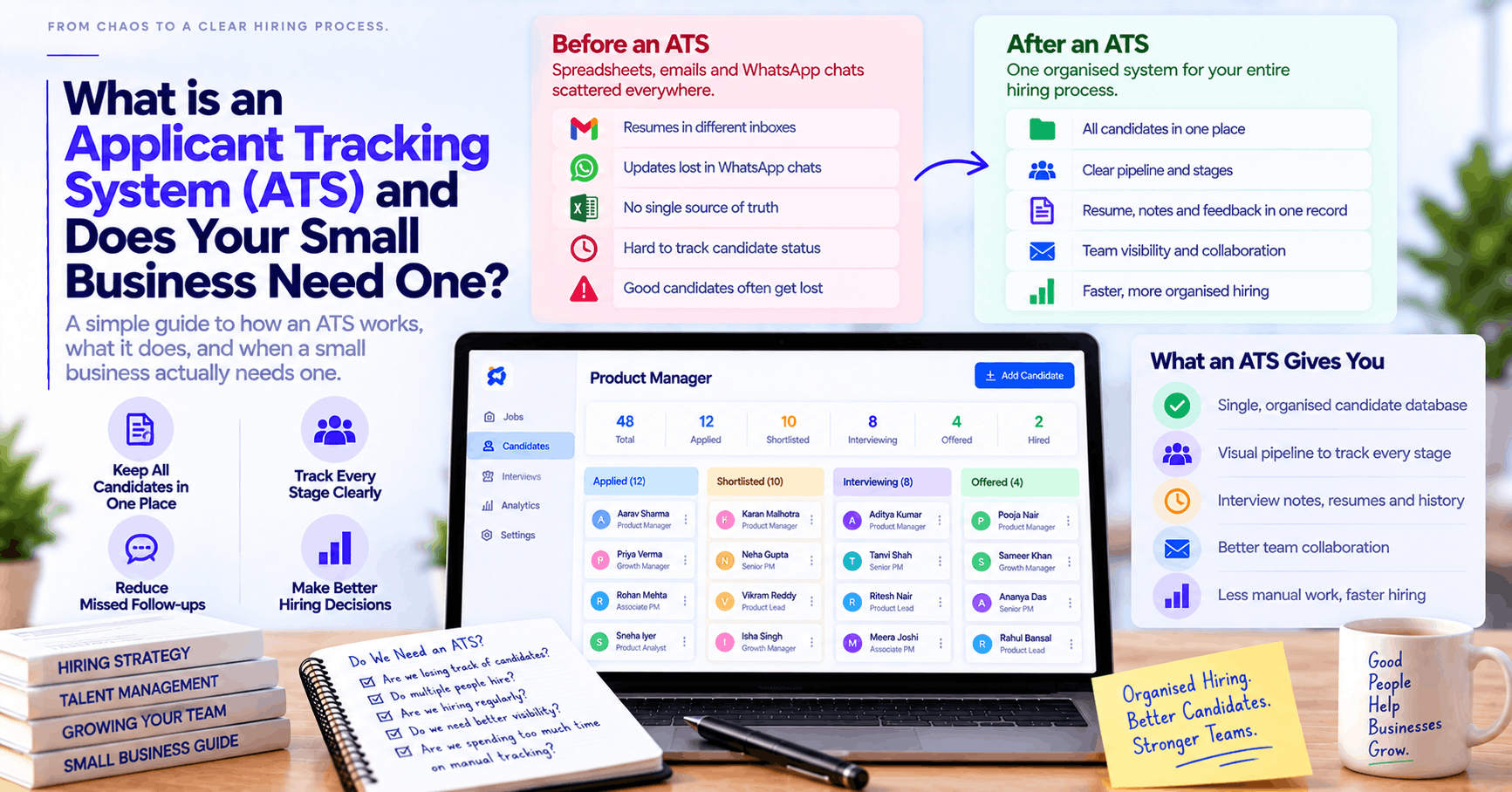
An Applicant Tracking System (ATS) is software that replaces the combination of Gmail folders, WhatsApp chats and Excel sheets most small Indian businesses use to manage hiring. It gives every candidate a single record that tracks their resume, interview notes, stage and communication history in one place. RecruitKar's visual applicant tracking system is a kanban-style pipeline where every candidate moves through stages visually, every team member sees the same status, and nothing gets lost in someone's personal inbox. Whether a small business actually needs one depends on one question: are you regularly losing track of candidates or decisions? If the answer is yes, this guide explains exactly what changes when you have one.
What an ATS actually is, in plain language
The term "Applicant Tracking System" sounds enterprise-scale — something for companies with HR departments and thousands of applications. In practice, an ATS is just a shared, organised system for managing hiring. It answers three questions at any point in time:
- Who is being considered for which role? Every candidate for every open position, in one place, not spread across six people's inboxes.
- Where are they in the process? Applied, shortlisted, interviewed, offered, hired or rejected — with a clear record of when each transition happened and who moved them.
- What do we know about them? Resume, interview feedback, compensation discussed, and notes from every recruiter or hiring manager who has interacted with them.
That's it. The complexity that gets layered on top — AI screening, automated outreach, video interviews — is built on top of this foundation. But the foundation itself is simply organised, shared information about candidates.
The hidden chaos of hiring through Gmail, WhatsApp and Excel
Before describing what an ATS does, it's worth being specific about what it replaces — because most small businesses don't realise how much time and candidate quality they're losing to their current system until they've used something better.
The Gmail folder problem
When hiring happens through email, resumes land in whoever posted the job listing's inbox. That person folders them manually — or doesn't. When a colleague asks "what happened with the marketing candidate from last week," the answer is "check your inbox" or "I'll forward it to you." When that colleague leaves the company, their candidate correspondence goes with them.
There is no shared view. There is no history. There is no way to know, six months later, why a candidate was rejected — or to resurface a strong candidate who applied for one role when a better-fit role opens.
The WhatsApp coordination problem
In Indian small businesses, hiring coordination often happens in WhatsApp groups — "did you speak to the developer candidate?" "yes, she seemed good, you should interview her" "ok send me her resume" "which one was it again?" This is fast for a single hire. It produces complete chaos for two or three simultaneous searches.
There is no search. There is no organised history. Decisions are made and forgotten. Candidates who were genuinely promising are lost not because they weren't qualified, but because nobody remembered to follow up and the conversation was buried under two weeks of other messages.
The Excel sheet problem
A well-designed Excel sheet for hiring is better than nothing — it can track candidate names, current stage and a few notes. It breaks down in three ways:
- It doesn't enforce a process. Anyone can move cells, delete rows or ignore the sheet entirely — and nobody knows when the data was last updated or by whom.
- It doesn't store documents. The resume is attached to an email somewhere. The interview notes are in a different tab. The offer letter is in a folder on someone's desktop. The "system" requires constant manual reconciliation to be useful.
- It doesn't create visibility. Whoever maintains the sheet knows what's in it. Anyone else who needs to know the status of a candidate has to ask, triggering a conversation that could have been avoided.
What changes when you have a proper ATS
Every candidate has one complete record
When a new resume comes in — through a job board, an email or a referral — it goes directly into the ATS and creates a candidate record. That record holds the resume, contact details, the role they applied for, and every note, interview feedback and communication update that follows. If your co-founder, a team lead and an outside recruiter are all involved in a hire, they're all looking at the same record rather than maintaining separate mental models.
Stage tracking happens in real time
A visual pipeline — like a kanban board — shows every candidate for every role at their current stage. When the hiring manager moves someone from "Shortlisted" to "Interview Scheduled," everyone with access sees that immediately. No status update meetings. No "where are we on this" messages. The pipeline is the answer.
Nothing falls through the cracks
An ATS with stage-based reminders or notification settings ensures that a candidate who's been in "Interview Scheduled" for two weeks without movement generates a visible flag — rather than being silently forgotten while the recruiter was busy with other roles. The system surfaces inaction rather than hiding it.
Past candidates are searchable
A strong candidate who wasn't the right fit for one role six months ago might be perfect for a different role that opens today. Without an ATS, finding them requires someone remembering they exist and locating the original conversation. With an ATS, a search for relevant experience across all past candidates returns them in seconds.
Does your small business actually need one?
Honest answer: it depends on where you currently are.
You probably don't need one yet if:
- You're hiring fewer than three or four people per year in total
- All of your hiring is done by one person with no coordination required
- Every role is filled from referrals and involves almost no candidate volume
- You have the discipline to maintain a shared spreadsheet consistently and everyone on the team actually uses it
At this scale and simplicity, the process overhead of adopting a new system may genuinely exceed the problem it solves.
You probably need one now if any of these are true:
- You've hired someone and then discovered a better candidate in your inbox a week later — because the inbox was your ATS and you couldn't see everything at once
- You've lost track of a candidate mid-process — couldn't remember their name, couldn't find the resume, didn't know who last spoke to them
- Your hiring involves more than one person making decisions and those people are not consistently sharing information
- You're hiring for multiple roles simultaneously — even two roles at once creates the coordination overhead that an ATS directly solves
- A candidate has had a bad experience because they were left without follow up, or received a duplicate outreach, or had to re-explain their background to someone who should already have known it
- You've had to reconstruct a hiring decision after the fact — "why did we pass on that person?" — and couldn't find the answer
- You're growing and plan to be hiring at least 8–12 people in the next year — the complexity of hiring grows faster than headcount, and starting with organised systems now is considerably easier than retrofitting them after the chaos has accumulated
What to look for in an ATS for a small Indian business
Small businesses evaluating ATS options for the first time often get overwhelmed by enterprise software that was built for companies with twenty recruiters and a dedicated HRIS team. The right ATS for a 20-person startup hiring 10 people this year is a different product from the right ATS for a 2,000-person company.
Simplicity of adoption is more important than feature depth
An ATS that nobody uses because it takes three weeks to set up and requires training sessions is worse than a spreadsheet. For a small team, the most important feature is that the system gets adopted and used consistently from day one — which means a simple, visual interface that feels immediately intuitive, not an elaborate configuration exercise.
A visual pipeline, not a database
The most intuitive ATS interfaces for small teams use a kanban-style visual pipeline: columns for each hiring stage (Applied, Shortlisted, Interviewed, Offered, Hired), with candidate cards that move between columns as the process advances. This makes the status of every hire visible at a glance without any reporting or queries — you see the pipeline, you know where everything is.
Shared access without complexity
The ability for a hiring manager, a recruiter and a founder to all see the same pipeline without managing separate logins, permissions matrices and access control overhead. Small teams need simple sharing — everyone involved in hiring has visibility.
Pricing that makes sense at low volume
Per-seat enterprise pricing for a small team that's hiring 8–10 people per year is difficult to justify. A usage-based or flat-rate model in INR that scales with actual hiring activity rather than team headcount tends to fit small Indian businesses better than a global SaaS tool priced in USD for markets with very different salary structures.
RecruitKar's hiring software for startups is built specifically for this use case — a visual ATS pipeline that a founder or office manager can set up and start using in a day, with a shared rupee credit pool that scales with hiring activity rather than charging a per-seat fee that makes no sense when one person is doing all the recruiting.
What an ATS doesn't do (being honest about the limits)
An ATS organises and tracks hiring — it doesn't automatically make hiring faster, better or less expensive on its own. Common misconceptions:
- "An ATS will find candidates for us." A basic ATS tracks candidates who apply; it doesn't proactively source. If your problem is finding enough qualified applicants, an ATS addresses the organisational layer but not the sourcing problem. AI sourcing tools — which discover and match candidates proactively — are a separate layer built on top of an ATS, not included in a basic ATS.
- "An ATS will make our hiring more objective." It provides structure and documentation, which supports consistency — but the quality of hiring decisions still depends on the quality of the questions asked, the rubric used and the judgment of the people involved. An ATS doesn't replace a structured interview process; it supports one.
- "An ATS is complicated and expensive." For enterprise software designed for large companies, this is sometimes true. Modern lightweight ATS platforms designed for small businesses are typically set up in hours, not weeks, and are priced at levels that small Indian companies can justify even at modest hiring volume.
How a small business gets started: a realistic onboarding timeline
- Day 1 (1–2 hours): Create an account. Set up the pipeline stages for your first open role (customise the default stages to match how your hiring actually works). Add the role. Import any existing candidates from your current spreadsheet or email. Share access with anyone else involved in this hire.
- Day 2–3: Post the job or begin sourcing. New applications or sourced profiles come into the pipeline automatically or with a quick add. Move candidates through stages as screening and interviews happen.
- Week 2: By this point, the visual pipeline shows you immediately where every candidate is — without a single status-update conversation. Interview feedback from the hiring manager is attached to the relevant candidate record rather than sent in a WhatsApp that you'll need to search for later.
- First hire: When a candidate accepts an offer, they move to "Hired" in the pipeline. The full record — every conversation, every interview note, every stage transition — is preserved and searchable forever, not lost when someone's Gmail account is closed.
The complexity of hiring grows faster than headcount — starting with organised systems now is considerably easier than retrofitting them after the chaos has accumulated.
Frequently asked questions
What's the difference between an ATS and an HRMS?
An ATS manages hiring — finding, screening, interviewing and onboarding candidates before they become employees. An HRMS (Human Resource Management System) manages employees after they're hired — payroll, attendance, leaves, performance reviews. Most small businesses need an ATS before they need a full HRMS. If you're currently hiring your first 10–20 employees, an ATS is almost certainly the right starting point; a full HRMS becomes relevant once the operational HR complexity of managing existing employees outgrows spreadsheets.
Can I use an ATS if I'm not a recruiter?
Yes, and most small business ATS users aren't professional recruiters — they're founders, office managers or department heads doing their own hiring alongside other responsibilities. Modern lightweight ATS platforms are specifically designed for non-specialists, with visual interfaces that require no recruiting technology background to use effectively.
What happens to my historical hiring data if I switch ATS later?
Most ATS platforms allow export of candidate data in CSV or Excel format. When evaluating a new ATS, confirm before committing that your data is exportable — and export a test file to verify the format is usable. Candidate records, notes and stage history are typically exportable; email conversation history may or may not be, depending on how it was logged.
Is an ATS secure — can I trust it with candidate personal data?
Any ATS you evaluate should be able to explain clearly how candidate data is stored, where it's hosted and how it's protected. Under India's DPDP Act 2023, organisations that collect and process candidate personal data have obligations around consent, storage and data subject rights. A compliant ATS should support your ability to meet these obligations — including providing candidate data on request and deleting it when retention periods expire.
How many open roles do I need before an ATS makes sense?
The more useful question is how many people are involved in hiring decisions. Even for a single role, if a founder, a team lead and an office manager are all involved in reviewing candidates, an ATS eliminates the coordination overhead that otherwise generates multiple status conversations per week. If only one person is making all hiring decisions and they can manage the volume comfortably in their inbox, a spreadsheet may genuinely suffice for now.
Organise your recruitment pipeline with RecruitKar's intuitive visual ATS. Set up your first pipeline in under an hour — a visual applicant tracking system that your whole team can use from day one, no training required.