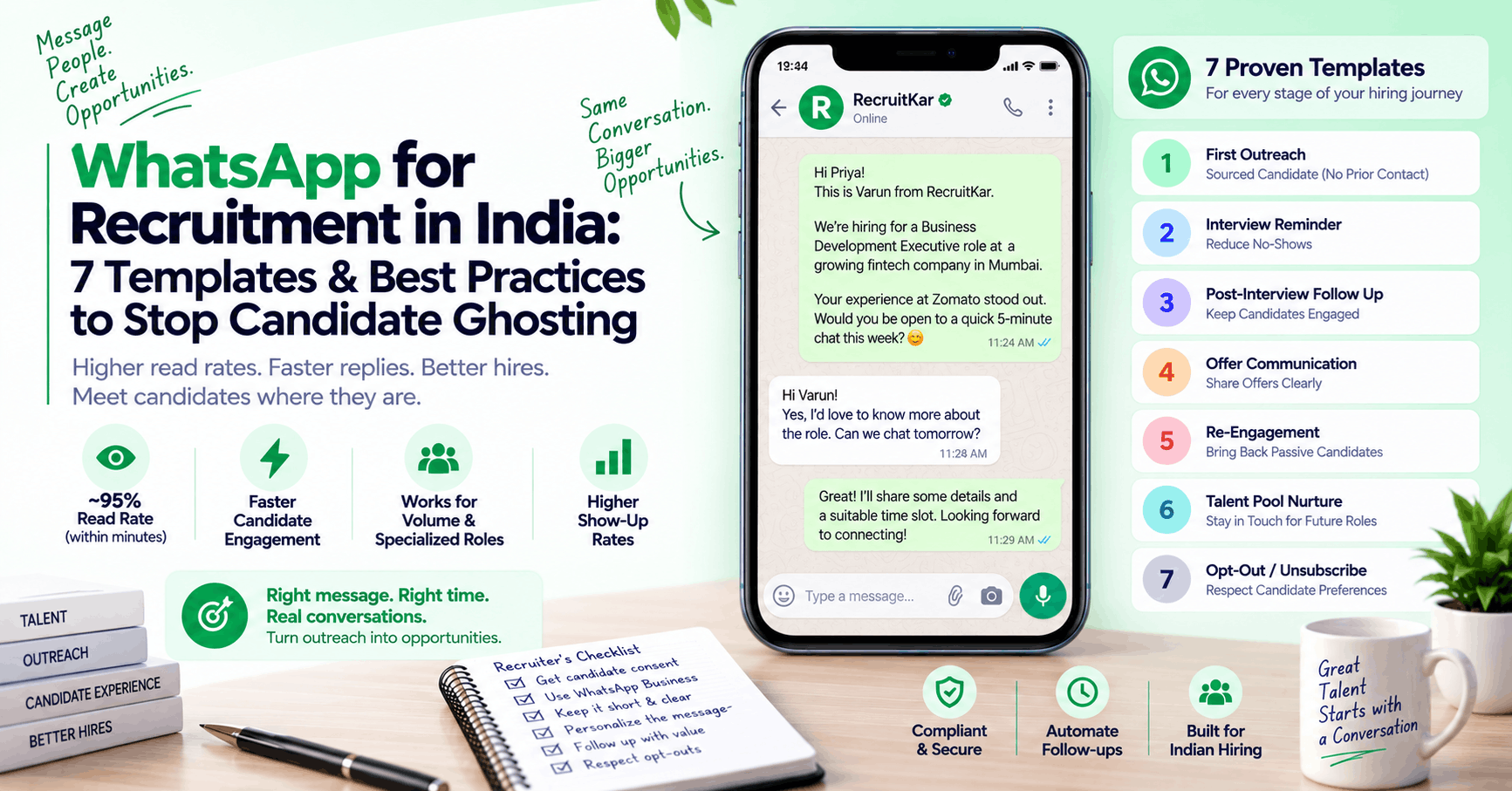
WhatsApp messages in India see roughly 95% read rates within minutes of delivery — compared to 18–22% for recruiting emails, most of which get read hours later if at all. For Indian recruiters losing candidates to slow outreach and unanswered follow-ups, the practical answer isn't better email subject lines. It's showing up on the channel candidates actually check. RecruitKar's WhatsApp candidate outreach sequences let recruiters send templated, tracked WhatsApp messages to candidates directly from the pipeline — no personal number required, no manual follow-up.
The seven templates below cover every stage where candidate ghosting typically happens: first contact, interview reminders, offer communication, and re-engagement after silence. They're designed for brevity, clarity, and the conversational register that WhatsApp actually requires — not email paragraphs pasted into a message window.
Why WhatsApp changes the candidate engagement equation in India
Email open rates have been in structural decline for years. The problem is acute in India specifically, for two overlapping reasons.
First, a large share of the Indian workforce — particularly candidates for volume roles in retail, logistics, manufacturing, BPO, and field sales — doesn't maintain or check a professional email inbox with any regularity. They applied through a mobile job board, their phone is their primary computing device, and WhatsApp is where everything that matters to them actually arrives.
Second, even for professional and white-collar candidates who do check email, competing for inbox attention is harder than it's ever been. The same candidate getting your sourcing email is also getting newsletter sequences, promotional offers, and notifications from every app they've ever installed. WhatsApp messages, by contrast, arrive in a context where people are already paying attention — which is why read rates stay high even for messages from numbers not already saved in a contact list.
The practical implication isn't that email is useless — it still has a place in a multi-channel sequence, particularly for formal communications that benefit from a paper trail. The implication is that using email alone for candidate engagement in India means accepting lower reach and slower response cycles than a WhatsApp-first or WhatsApp-primary approach produces.
Compliance and consent: what you need to do before sending
WhatsApp has real rules about business messaging, and ignoring them doesn't just create legal risk — it gets phone numbers blocked, which is operationally catastrophic for a recruiting operation that relies on the channel.
- Get explicit consent first. A candidate who submitted their number on a job application, consented to be contacted by a recruiter, has implicitly given consent for recruiting-related communication. A number scraped from a website, purchased from a data vendor, or obtained without any direct engagement has not. The consent line matters both for WhatsApp's own policies and for India's PDPB (Personal Data Protection Bill) framework.
- Use WhatsApp Business, not a personal number, for volume sending. WhatsApp Business API (accessed through an approved BSP, or through platforms like RecruitKar that have the integration built in) enables message templates, tracking, and business-account protections that a personal number doesn't. Running volume candidate outreach through a personal number risks that number being reported as spam and blocked — taking down your entire recruiting communication operation with it.
- Keep an opt-out mechanism available. Candidates should be able to say "please don't contact me on WhatsApp" and have that respected. Building a simple response to opt-out messages, and honouring them immediately, is both good practice and increasingly necessary under India's evolving data-protection framework.
- Don't message outside reasonable hours. The informality of WhatsApp doesn't make it appropriate to send recruiting messages at 10pm or before 8am. Candidates notice, and it shapes their first impression of the company before they've even spoken to anyone.
The 7 templates
Template 1: First Outreach — Sourced Candidate (No Prior Contact)
Use when: You've identified a candidate through sourcing and are making first contact
Character target: Under 300 characters for the main message; follow-up shorter
Hi [First Name], I'm [Your Name] from [Company]. I came across your background in [specific skill/domain] and think you could be a strong fit for a [Role] we're hiring for in [City/Remote]. Open to a quick 10-minute call this week? I can share more details then.
What makes it work: One sentence of personalisation (the specific skill reference), one specific ask (10-minute call), no attachment, no PDF. The low time-ask ("10 minutes") reduces friction on the first touch.
Follow-up (Day 3 if no reply):
Hi [First Name], just following up on my earlier message about the [Role] at [Company]. Happy to answer any questions first if that's helpful — what would you like to know?
Template 2: Application Acknowledgment (Inbound Candidate)
Use when: A candidate has applied through your jobs page, a job board, or a referral
Hi [First Name], thanks for applying for the [Role] at [Company]. We've received your application and will review it within [X] working days. You'll hear from us either way. In the meantime, feel free to message here if you have any questions. — [Your Name], [Company] Talent Team
What makes it work: Closes the immediate anxiety of "did my application go through," sets a clear timeline, and opens a low-friction channel for questions that would otherwise lead to no-shows or passive drop-off.
Template 3: Interview Invitation
Use when: You're inviting a candidate who has cleared initial screening to schedule an interview
Hi [First Name], great news — you've been shortlisted for the next round for the [Role] at [Company]. We'd like to schedule a [30-minute / 1-hour] [video / in-person] interview. Here are three slots that work on our end: 📅 [Day, Date, Time] 📅 [Day, Date, Time] 📅 [Day, Date, Time] Which works for you? Or share your availability if none of these fit.
What makes it work: Providing three specific options rather than asking the candidate to propose a time eliminates the most common scheduling loop. The emoji timestamps are a WhatsApp-native convention that makes options visually scannable on mobile.
Template 4: Interview Reminder (24 Hours Before)
Use when: A candidate has confirmed an interview slot and the interview is tomorrow
Hi [First Name], just a reminder about your [Role] interview at [Company] tomorrow, [Day] at [Time IST]. 🔗 [Meeting link / Address] Please keep 10 minutes before the slot to check your audio/video. Let me know if anything's changed. — [Your Name]
Follow-up (2 hours before):
Hi [First Name], see you in about 2 hours for your [Company] interview. Link: [URL]. Good luck!
What makes it work: Two-touch reminders — one 24 hours before and one 2 hours before — consistently reduce no-show rates. The 24-hour message handles genuine forgetfulness; the 2-hour message handles the morning of a no-show where the candidate simply lost track. Both are short enough not to feel like pressure.
Template 5: Post-Interview Follow-Up
Use when: An interview has happened and you want to keep the candidate warm while the team deliberates
Hi [First Name], thanks for taking the time today — it was a good conversation. We're completing interviews this week and plan to be in touch by [specific date] with next steps. Feel free to message if anything comes up in the meantime. — [Your Name]
What makes it work: Eliminating post-interview silence is one of the highest-leverage things a recruiter can do for candidate experience and drop-off reduction. This template takes 20 seconds to send and prevents the candidate from assuming they've been rejected or forgotten.
Template 6: Offer Communication (Initial)
Use when: You're extending a verbal offer before the formal letter follows
Hi [First Name], great news — the team wants to move forward with you for the [Role] at [Company]. 🎉 We'll be sending a formal offer letter to [email address] within [X] working days. The package details: CTC [₹X LPA], joining date [Date], [Remote/Hybrid/In-office]. Let me know if you have any questions before the letter arrives. Looking forward to having you on board. — [Your Name]
What makes it work: Delivering the offer news on WhatsApp first — before the formal email — creates a positive first moment on the channel the candidate is actually paying attention to, and reduces the anxiety of waiting for a formal letter that might not come for a day or two. The letter still follows in writing, maintaining the paper trail for formal documentation.
Template 7: Re-engagement After Silence (Candidate Who Has Gone Quiet)
Use when: A candidate who confirmed an interview or was progressing in the pipeline has stopped responding for 5–7 days
Hi [First Name], I've tried reaching you a couple of times about the [Role] at [Company] and haven't heard back — completely understand if you've moved on or the timing isn't right. If you're still interested, I'd love to reconnect. And if not, no worries — I'll close the loop on our end. Just a yes or no helps us either way. 🙂 — [Your Name]
What makes it work: The explicit "yes or no" framing gives the candidate an extremely low-effort way to respond — even a single-word reply tells you where things stand. The graceful acknowledgment that they may have moved on reduces the social pressure that often keeps candidates silent rather than sending a disappointing message. This template frequently generates replies that earlier messages didn't, precisely because it removes pressure.
Message design principles for recruiting on WhatsApp
- Short is always better. WhatsApp is read on a phone screen, usually while doing something else. A message that requires scrolling to finish is a message that often doesn't get finished. Keep first-touch messages under 300 characters where possible; follow-ups should be shorter, not longer.
- One message, one ask. Every WhatsApp message should have one clear purpose and one clear next action for the candidate. "Let me know if you're interested, and if so please confirm your availability, and also share your updated CV and current CTC" is four asks. Pick the one that matters most at this stage.
- Write the way you'd talk to the person, not the way you'd write an email. "Hi [First Name]" rather than "Dear [First Name]." Contractions are fine. Brief sentences work better than complex ones. Emoji are contextually appropriate for informal updates (interview reminders, offer delivery) and best omitted for more formal communications.
- Don't use WhatsApp as a document delivery channel. Sending a PDF job description, a CV intake form, or a lengthy screening questionnaire as a WhatsApp attachment dramatically reduces completion rates. Use WhatsApp to initiate a conversation and confirm intent — move to email or a link for anything that requires the candidate to engage with a document.
- Track who's responded and who hasn't — systematically. Managing WhatsApp outreach through a personal phone number at any real volume quickly becomes unmanageable. A multi-channel outreach platform that sends WhatsApp messages from a business number, tracks delivery and read status, logs responses against the candidate's pipeline record, and auto-triggers follow-ups based on response (or non-response) is what makes WhatsApp a scalable recruiting channel rather than a personal communication overhead.
Building a WhatsApp + email sequence that works together
WhatsApp and email aren't competing channels — they serve different functions in a candidate sequence, and the highest reply rates come from using both together rather than choosing one.
A practical combined sequence for a sourced passive candidate:
- Day 1 — Email: Personalised first outreach (longer, more context)
- Day 3 — WhatsApp: Short first touch referencing the email ("Hi, I emailed earlier about a [Role] opportunity...")
- Day 6 — Email: Follow-up with a piece of role-specific context
- Day 10 — WhatsApp: Brief final touch or close
The email provides context and documentation; the WhatsApp gets read. Together, the sequence has a significantly higher chance of generating a reply than either channel alone.
RecruitKar's multi-channel outreach platform runs both in a single tracked sequence against each candidate — so a recruiter sets up the cadence once per role type, and the system handles scheduling, delivery, and reply tracking without manual management of two separate tools.
Frequently asked questions
Is WhatsApp recruiting legal in India?
Yes, when done properly. The key requirements are: explicit or implicit consent (the candidate shared their number in the context of a job search), a business number rather than a personal one for volume sending, and honoured opt-outs. India's PDPB framework and WhatsApp Business's own acceptable-use policies both apply — but recruiting communication to a candidate who has engaged with you for that purpose is well within normal acceptable use. The grey area is outreach to numbers obtained without any prior engagement, which is where both legal risk and block risk are highest.
What's the ideal length for a WhatsApp recruiting message?
First outreach: under 300 characters, ideally closer to 200. Follow-ups: shorter. Reminders and status updates: as short as they need to be to convey the essential information, typically 50–100 characters. Anything requiring paragraph-level explanation belongs in an email with a WhatsApp message pointing the candidate to check it.
Should I use a personal or business WhatsApp number for recruiting?
A business number, always. Personal numbers used for volume outreach are routinely reported and blocked, which takes down your ability to communicate with all candidates through that number simultaneously. A WhatsApp Business API number through a platform like RecruitKar appears to candidates as a business name rather than an unknown number, which also significantly improves open rates and response rates compared to messages from an unrecognised personal number.
Do candidates actually reply to WhatsApp from recruiters?
Consistently — and at significantly higher rates than email, particularly for entry-to-mid-level candidates in India for whom WhatsApp is the primary communication channel. The templates above are designed specifically to lower the barrier to reply: short, specific, one ask, and no attachment or form required to respond. The re-engagement template (Template 7) in particular generates replies from candidates who had stopped responding to email, simply because the format and the "just a yes or no" framing makes responding feel easy.
How do I keep track of WhatsApp conversations with multiple candidates?
This is the key operational challenge of WhatsApp recruiting at scale. A personal phone handles five to ten ongoing recruiting conversations comfortably — beyond that, it becomes a genuine bottleneck and tracking risk. A platform built for how India hires, with WhatsApp integration that logs every message against the relevant candidate's record, tracks reply status, and allows multiple recruiters to share a single business inbox, solves this without requiring every recruiter to manage a separate personal device.
Set up your sequence: Send templated, tracked WhatsApp messages to your entire sourced candidate list from RecruitKar's pipeline — no personal number required. WhatsApp candidate outreach sequences included in every plan.